


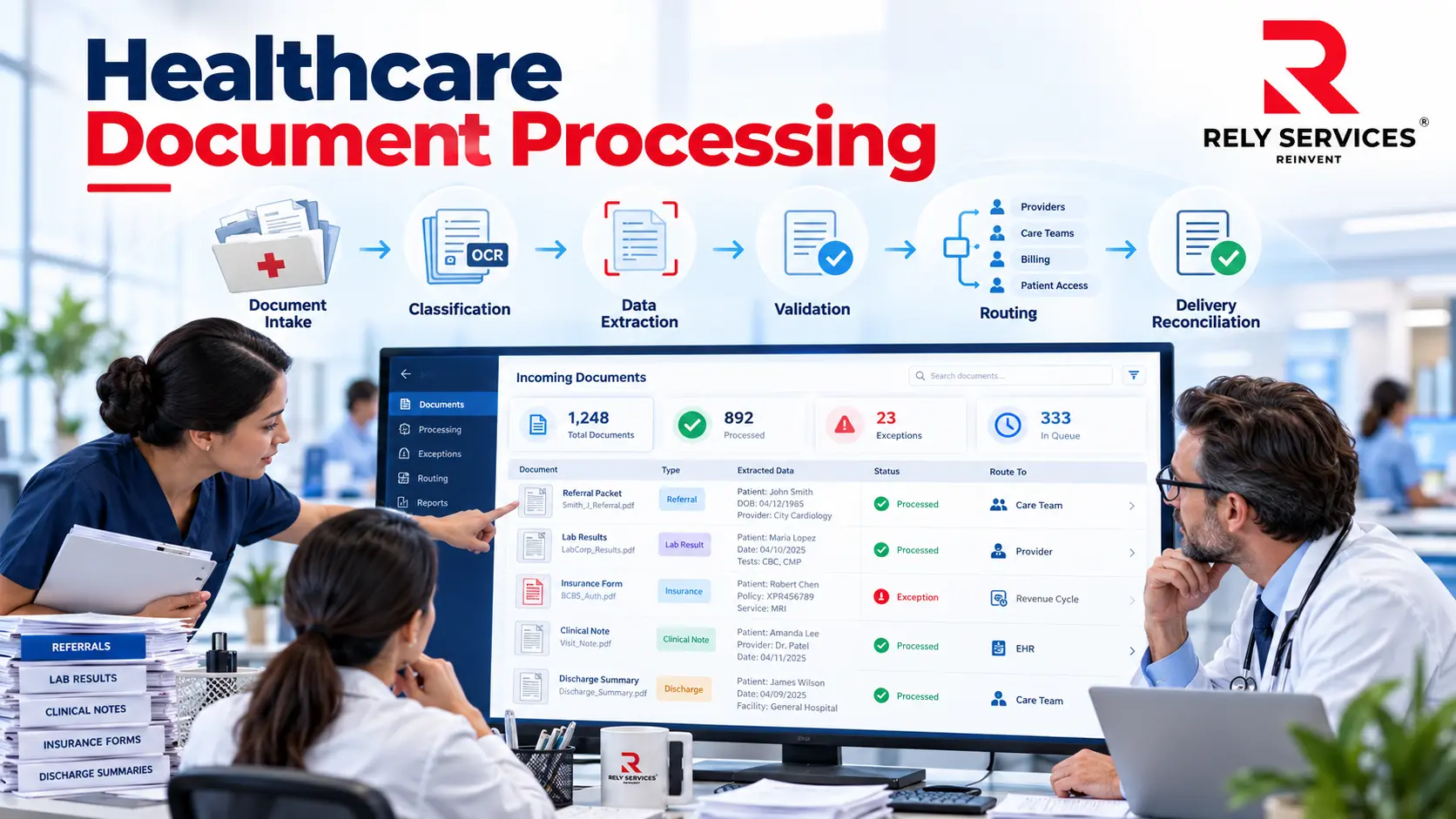
Healthcare document processing is the operational workflow used to receive medical documents, identify what they contain, capture necessary information, resolve exceptions, and deliver the result to the appropriate system or team. It connects incoming records and forms with the work those documents are supposed to support.
For healthcare administrators, the central question is not simply how to scan more pages. It is how to make sure the right document reaches the right workflow, with enough context for the next person to act. A readable file can still be incomplete, misrouted, duplicated, or waiting in a queue no one owns. Medical data entry services can support the accurate capture and handling of healthcare information as part of a well-defined document workflow.
This guide follows the document from intake to reconciliation. It focuses on workflow design and controls rather than terminology mapping or the detailed design of a record index. All operational examples are hypothetical.
Start with the business event the document supports
Map documents to specific activities. A referral packet supports a referral workflow. A registration form supplies information needed for intake. A payer request may require review by a designated revenue cycle team. The same file format can support very different actions.
For each activity, identify the receiving team, required information, completion condition, and escalation path. Avoid a single definition of “processed” that means only that a file was uploaded. Completion should describe the document’s usable state in the intended workflow.
Build a document inventory
List the document categories actually received, their channels, typical formats, and known exceptions. Include source portals, approved electronic transfers, paper scanning, and any other channels the organization uses.
Record the operational owner and sensitivity of each category. Some documents may require special handling or additional review. Do not assume that one access rule, retention schedule, or routing decision is appropriate for every category.
Distinguish a document from a work item
A referral packet may contain several documents but create one referral work item. A single incoming file may also contain material for more than one patient or activity. Decide how the workflow will recognize those boundaries.
Preserve the relationship between the original submission, any separated documents, and the resulting work items. That relationship helps reviewers investigate missing pages, duplicate submissions, and a request to locate the original packet.
Design intake so missing work is visible
Intake is the point where a received document becomes accountable work. Assign a receipt identifier and record the channel, received time, source context, and initial routing status using the organization’s approved tools.
Receipt information should help reconcile what arrived with what entered processing. It should not create an unnecessary parallel store of patient information. Limit the captured details to the permitted operational purpose.
Check completeness without making assumptions
Perform an initial check for unreadable pages, missing attachments, duplicate transmissions, and documents outside the channel’s permitted scope. A packet can be technically accessible without containing everything the next team needs.
For a hypothetical referral, intake may expect a referral order and supporting records. If supporting material is absent, route the work through an approved follow-up process. Do not fill the gap from an unrelated encounter simply to mark the packet complete.
Establish a duplicate review rule
Repeated submissions can look similar without being identical. A later file might contain a corrected page or an additional attachment. Compare the relevant content and context before suppressing work as a duplicate.
Retain an appropriate record of the decision and the relationship between submissions. Automated duplicate detection can suggest a match, but ambiguous cases need an escalation path. A file name alone is a weak basis for discarding a submission.
What are the stages of healthcare document processing?
A practical healthcare document workflow includes receipt, capture, classification, extraction of needed fields, validation, exception review, routing, and delivery reconciliation. Define an owner and completion condition for each stage. The exact sequence should reflect the document family and receiving team’s requirements.
These stages answer different questions. Capture makes the material available in a usable digital form. Classification determines what kind of document it is. Extraction transfers selected information into structured fields or another working format.
Keeping these stages distinct helps locate failures. Poor image quality calls for a different response than a document assigned to the wrong category or a correctly classified form with an incorrectly captured date.
Check image quality before field extraction
For scanned material, inspect orientation, legibility, page boundaries, and whether all relevant pages were captured. Define when a rescan or source follow-up is needed. Avoid assuming that increasing resolution will repair information missing from the original.
Preserve the approved original or source representation according to organizational policy. Reviewers should be able to compare the extracted information with the underlying document when resolving an uncertainty.
Treat OCR as an input to review
Optical character recognition converts visible text into machine-readable text. Its output should not be treated as proof that a field was captured correctly. Handwriting, layout variation, poor scans, and unusual characters require explicit testing in the chosen system.
Use representative samples to determine which fields can proceed automatically and which require review. A confidence score can inform routing, but the organization must validate how that score relates to actual errors in its documents.
Define the minimum useful extraction set
Choose fields because a downstream activity needs them. For a particular intake process, that might mean a patient identifier, document category, service date, and receiving department. Another workflow may need a different set.
Avoid collecting every visible field merely because the software supports it. Extra extraction creates more information to protect, validate, and maintain. Give each captured field a purpose and an accountable owner.
Make validation proportional to consequence
Validation should cover both the field and the context in which it will be used. An accurately read number is not useful if it belongs to the wrong patient or the wrong document section.
Define high-consequence fields
Identify which errors could misdirect work or affect a consequential decision. Patient association, routing destination, and dates used to drive follow-up may merit different controls from an optional descriptive note.
Specify the review method for each field category. Options can include source comparison, a second review for selected situations, or an exception queue. These are design choices to validate, not universal promises that a particular method eliminates error.
Check packet-level completeness
Field validation can pass even when an entire attachment is missing. Add checks at the packet and work-item levels. Compare the received material with the defined requirements for that workflow.
If pages are separated or recombined, test that the operation preserves patient boundaries and page order where order matters. A reviewer should know whether a missing field reflects a source omission or a processing failure.
Route work with explicit ownership
Use a routing matrix that identifies the destination, required context, and fallback owner for each document category. Include handling for uncertain categories and submissions that contain multiple categories.
| Situation | Recommended operational response | Evidence to retain |
| Unreadable required page | Request a usable source through an approved channel | Reason, owner, request status |
| Uncertain patient association | Hold for authorized identity review | Review decision and source reference |
| Unrecognized document type | Send to the designated classification reviewer | Final category and rule change, if any |
| Destination unavailable | Queue with a monitored retry or manual handoff | Delivery attempts and final acknowledgment |
Do not let fallback routing become a permanent unowned inbox. Monitor the volume and age of work sent there. Repeated exceptions may reveal a missing document category, unclear responsibility, or an upstream training issue.
Separate urgency from arrival order
Some workflows need a defined prioritization process. Have appropriate operational or clinical leaders establish the criteria and who can assign priority. Do not infer clinical urgency from a keyword without an approved, tested process.
Record when priority changes and why. Make clear who remains accountable while the work moves between teams. A label that says “urgent” is not useful if it bypasses the only queue with active supervision.
How do you confirm that medical documents reached the right team?
Confirm that the intended destination received the expected document, associated it with the correct work item, and made it usable by the responsible team. A transmission log alone establishes only that a system attempted to send something. Define acknowledgment and reconciliation evidence for the workflow.
Define acknowledgment at the right level
Decide what counts as successful delivery for each destination. It might require an application acknowledgment, confirmation that the attachment is associated with the intended work item, or a documented manual handoff.
Handle partial success explicitly. If structured fields arrive but the attachment fails, the work item may appear complete to someone who cannot see the missing document. Include these mixed outcomes in testing and monitoring.
Reconcile received, completed, and outstanding work
Compare intake records with processing and delivery results over a defined period. Identify items still in progress, rejected submissions, canceled duplicates, and unresolved exceptions. Explain exclusions rather than allowing them to disappear from the count.
Use reconciliation to find lost work, not just to produce a completion percentage. Review samples of supposedly completed items to confirm that the documented completion condition still reflects how receiving teams operate.
Plan capacity around review work
Estimate workload separately for intake, automated handling, human validation, source follow-up, and exception resolution. A workflow with fast capture can still stall if only one team can resolve patient association questions. Use observed pilot data to understand that workload rather than relying on a supplier’s page-processing estimate.
Define how work is covered during absences and predictable peaks. Where a specialist must review an exception, identify an authorized backup or a clearly communicated waiting state. Do not ask an unqualified reviewer to make the decision simply to clear the queue.
Also account for work that returns after apparent completion. A receiving team may discover a missing attachment, incorrect routing, or an unusable page. Establish a correction channel that links the returned item to its original receipt and records the reason for rework.
Review those reasons with the upstream owner. If the same issue recurs, determine whether intake instructions, source forms, validation, or handoff criteria need to change. This makes downstream feedback part of process maintenance rather than an informal conversation that leaves no trace of the problem.
Protect information throughout the workflow
Review permitted access, approved transfer channels, temporary working files, logs, and the disposal of local copies. Apply the organization’s privacy and security procedures to the complete path, including exceptions and manual workarounds.
HHS privacy and security guidance provides a starting point for evaluating applicable HIPAA requirements. Whether a particular workflow, organization, or service arrangement satisfies those requirements needs qualified review. A document-processing tool does not establish compliance by itself.
Evaluate external processing arrangements carefully
If another organization performs capture or review, define the allowed tasks, access, escalation responsibilities, and acceptance evidence. Have the appropriate team evaluate applicable contractual and privacy requirements before sharing information.
Rely Services’ healthcare operations service information can help frame a discussion of staffing needs; confirm task scope, access arrangements, and exception ownership before sharing documents.
Pilot one document family end to end
Select a document family with a manageable range of sources and an engaged receiving team. Build a test set that includes normal inputs, incomplete packets, duplicates, mixed-patient files, and destination failures.
Agree on acceptance criteria before measuring results. Criteria should describe correct association, necessary field capture, complete delivery, exception ownership, and reconciliation. Keep expected results separate from actual observations.
During the pilot, trace selected items from receipt to the receiving team’s use. Investigate where the workflow required manual intervention and whether the intervention was recorded. Update operating instructions before expanding to more channels or document families.
Measure flow and rework together
Useful measures include elapsed time from receipt to accepted delivery, work awaiting review by reason, repeat handling, and the proportion of submissions needing source follow-up. Define whether time includes periods spent waiting for an external response.
Pair speed measures with quality measures. Faster extraction is not a useful improvement if receiving teams spend more time correcting patient association or locating attachments. Examine downstream rework alongside processing completion.
Review performance by document family and source channel. Aggregated numbers can hide a troublesome form or a newly introduced layout. Use the findings to decide whether to change intake instructions, validation rules, staffing, or system configuration.
Turn the workflow into a usable operating procedure
Create a procedure that identifies entry conditions, processing stages, required checks, exception destinations, and completion evidence. Include the decisions a new reviewer is likely to face rather than only screenshots of the ideal path.
Assign an owner to maintain the procedure when a form, channel, or destination changes. Test updates with people who perform the work and people who receive it. A documented process is useful only when it matches the current workflow.
Start by tracing one document family from arrival to accepted delivery. Resolve the handoffs that make work invisible, then expand the approach. A dependable healthcare document processing workflow gives information a clear path to action and makes exceptions visible.
If document intake is creating a backlog, review Rely Services’ medical data entry support and discuss your document types, review requirements, and handoffs before deciding whether external help fits.
Frequently asked questions
Should every paper form be redesigned before digitization?
No single sequence fits every operation. A stable, clearly structured form may be suitable for an initial pilot. A form with ambiguous labels or unnecessary fields may benefit from redesign first. Evaluate the downstream use and source constraints before deciding whether redesign or capture improvements should come first.
What happens when a source changes its form layout?
Treat a material layout change as a trigger to review classification, extraction, and validation rules. Test representative new submissions before expanding automated handling. Keep a fallback path so unfamiliar layouts can receive review without disappearing from the intake queue.
Can handwritten documents be included in the workflow?
Include handwritten documents only through a tested capture and review path. Define how uncertain text reaches an authorized reviewer and when to request a clearer source. Never substitute a plausible word or number for information the reviewer cannot reliably read.
How should teams handle password-protected attachments?
Route inaccessible attachments through an approved access-resolution process. Do not bypass protection or request credentials through an unapproved channel. Keep the work item open with an assigned owner until the source supplies usable material or an authorized reviewer determines the next action.
Can several departments use the same intake channel?
They can share an intake channel if routing rules, access boundaries, and responsibility are explicit. Give uncertain submissions a monitored fallback destination. Test mixed-department packets so shared receipt does not result in inappropriate access or an unowned handoff.
How should a document workflow handle downtime?
Define an approved continuity procedure for receiving and tracking work while a destination is unavailable. After recovery, reconcile pending items and prior delivery attempts before retrying. The procedure should prevent missing attachments and duplicate work items, with a named recovery owner.