


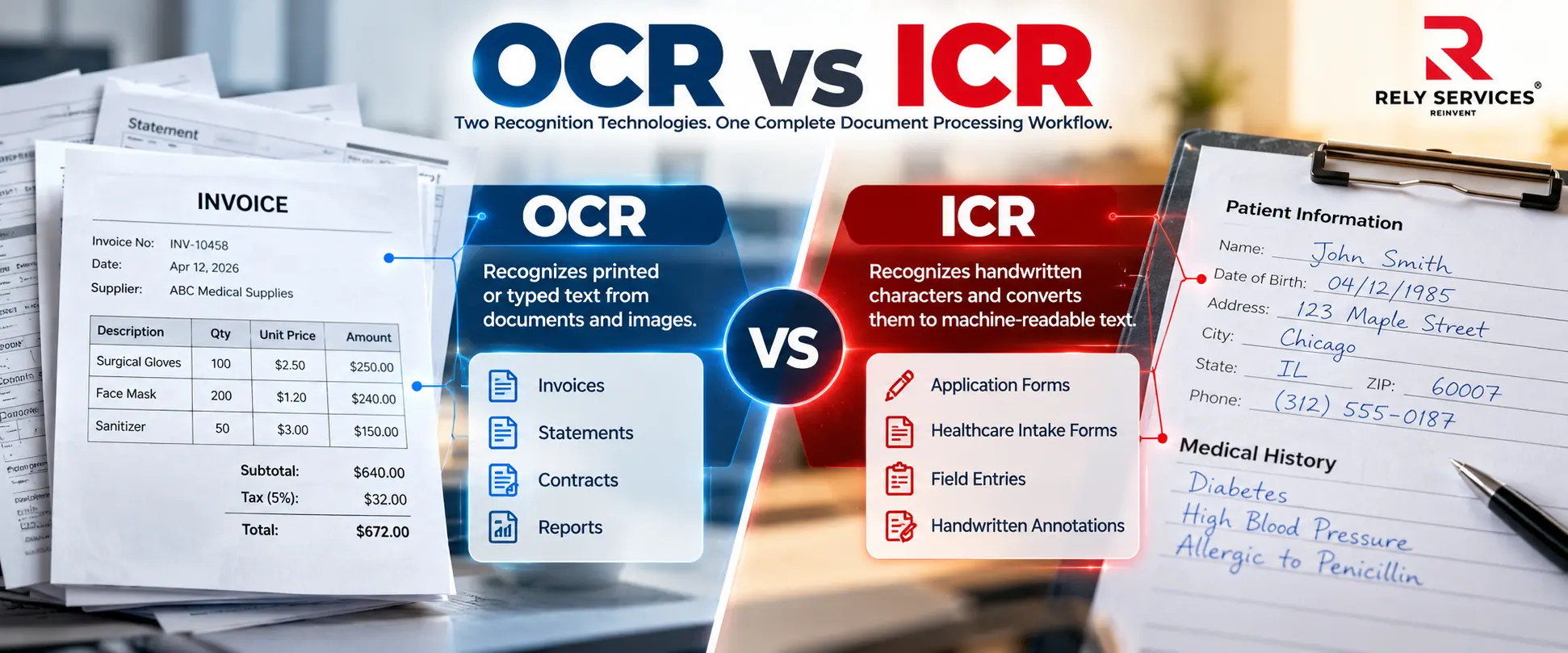
Businesses receive documents in many forms, from neatly printed invoices to handwritten applications and forms containing both. Understanding OCR vs ICR helps organizations choose an appropriate way to capture information from these different document types.
An insurance application may have printed questions and handwritten answers. A delivery receipt may combine typed shipment details with handwritten exception notes. A healthcare intake form may contain patient-written information beside standard printed fields.
OCR, or Optical Character Recognition, is commonly used to recognize printed or typed text. ICR, or Intelligent Character Recognition, generally refers to recognition capabilities designed for handwritten characters.
However, choosing between OCR and ICR is not simply a software decision. Businesses also need to consider document quality, handwriting style, required fields, output format, validation rules, and the amount of human review needed. This guide explains the difference between OCR and ICR and how each can fit into a reliable document-processing workflow.
What Is OCR?
Optical Character Recognition converts text in scanned documents, images, and image-based PDFs into machine-readable information.
For example, OCR can recognize a printed invoice number, supplier name, date, or description. The resulting text may be used to create a searchable document or support field extraction for another business process.
IBM’s explanation of Optical Character Recognition describes OCR as technology that converts images of text into machine-readable formats. It also explains that modern OCR can incorporate AI-based recognition methods.
OCR is commonly associated with printed invoices, statements, contracts, reports, books, forms, and archived records.
Recognition alone does not guarantee usable business data. A workflow may still need to identify which text belongs to which field, preserve table relationships, check required values, and resolve exceptions.
Rely’s OCR services support this wider process through extraction, cleanup, validation, indexing, conversion, and human review where required.
What Is ICR?
Intelligent Character Recognition (ICR) refers to technology used to recognize handwritten characters and convert them into machine-readable text.
Unlike printed characters, handwriting varies significantly. Two people may write the same letter differently. The same person may also change letter shape, spacing, or slant across a single form.
ICR capabilities are designed to address some of this variation. They are often used for handwritten entries within defined areas, such as names, reference numbers, dates, or other fields on forms.
Importantly, hand-printed block letters and connected cursive writing are different recognition problems. A system that supports handwritten characters may not support unrestricted cursive text.
| Comparison area | OCR | ICR |
| Main association | Printed or typed text recognition | Handwritten character recognition |
| Common source documents | Invoices, statements, contracts, reports, books | Handwritten forms, applications, field entries, and annotations |
| Text variation | Printed fonts and layouts | Individual writing styles, spacing, and character shapes |
| Common challenges | Poor scans, small fonts, skew, tables, and complex layouts | Unclear writing, connected letters, overwritten values, and inconsistent spacing |
| Review requirements | Depend on source quality, field importance, and extraction results | Depend on handwriting readability, supported capabilities, and field importance |
| Best evaluation method | Test representative documents and required fields | Test actual handwriting samples, including difficult examples |
These categories describe common usage rather than a universal boundary. Modern document-processing products may combine printed-text and handwriting-recognition capabilities within the same workflow.
Why the Difference Matters to Business Operations
A business can select a capable recognition tool and still experience poor results if the workflow does not match the source documents.
For example, a system tested only on clean printed forms may struggle when production files include handwritten responses. Similarly, a handwriting-recognition capability may perform adequately on separated block letters but poorly on crowded cursive notes.
The result can be incorrect identifiers, incomplete fields, document exceptions, and manual correction work.
This makes document assessment important before processing begins. Teams should understand what is printed, what is handwritten, which fields are needed, and how uncertain output will be reviewed.
The aim is not to extract every visible character automatically. It is to produce information that is reliable enough for its intended business use.
Where OCR Fits in Business Workflows
Finance and Accounting
Printed invoices, receipts, statements, and purchase orders are common OCR use cases.
Recognition can support the capture of supplier names, invoice numbers, dates, amounts, and line items. The extracted information still needs validation before it supports approvals, reconciliation, or payment preparation.
For example, correctly recognizing a number does not prove it is the invoice total. The workflow must distinguish the total from tax, subtotal, balance due, and other amounts.
Businesses handling these requirements can connect document capture with invoice data entry services.
Insurance Operations
Insurance teams manage printed policy documents, claims correspondence, estimates, applications, and supporting records.
OCR can support text capture from suitable printed documents. When a file also contains handwritten responses or notes, an additional recognition or manual-review step may be needed.
Document Archives
OCR is useful when organizations want to search printed records without opening every page manually.
A searchable archive is different from a structured database. A document may need only a searchable text layer and indexing, while another project may require specific fields extracted into a spreadsheet or business system.
Where ICR May Fit
Handwritten Applications and Forms
Applications and intake forms may contain handwritten names, dates, reference numbers, and responses.
Suitable handwriting-recognition capabilities can assist with capture, particularly when forms use clearly defined fields. However, suitability should be established through sample testing rather than assumed.
Healthcare Administrative Documents
Healthcare organizations may receive patient-completed intake forms, registration updates, referral documents, and other handwritten administrative records.
Recognition can assist with appropriate fields, but uncertain patient identifiers, medication information, or other consequential content requires approved review. A processing team should not infer missing clinical information or interpret unclear writing as a clinical decision.
Medical data entry services can provide a relevant operational support layer for authorized record preparation, updates, indexing, and validation.
Logistics Records
Delivery receipts and transportation documents may combine printed shipment information with handwritten quantities, exception notes, or references.
A mixed-document workflow can use different capture approaches for different parts of the page, followed by checks against the associated shipment record.
The presence of a signature is a separate issue. Recognizing handwritten text does not by itself authenticate a signature or establish that a delivery was authorized.
How to Process Documents Containing Both Printed and Handwritten Text
Many organizations do not need to choose one approach for an entire document collection.
Instead, they need a workflow that identifies different content types and applies suitable processing to each.
A practical process starts with representative samples. The team identifies required fields, document layouts, handwriting areas, scan-quality problems, and expected output.
Printed sections can then be processed using appropriate OCR capabilities. Handwritten fields can use supported recognition capabilities or enter a manual-capture queue. Extracted information is checked against agreed formats, reference records, and business rules.
Unclear or conflicting values should be flagged for review. Reviewers should preserve uncertainty rather than force a guessed value into the completed record.
For forms-heavy projects, forms processing services can support the wider capture, classification, validation, and exception-handling workflow.
What neither OCR nor ICR Can Guarantee
Neither approach should be assumed to deliver perfect results across every document.
Poor image quality, missing pages, faint writing, overlapping stamps, complex tables, and unusual layouts can affect processing. Handwritten content adds further variability.
Recognition technology also does not independently confirm that information is true. A clearly written account number may be incorrect. A correctly recognized date may conflict with another record. An accurately transcribed amount may belong to the wrong customer or claim.
Businesses need validation and document association in addition to recognition.
Avoid comparing products using a single headline accuracy percentage. Test the fields and document types that matter to your operation, and review critical values separately from less important text.
How to Choose the Right Approach
Begin with the business requirement rather than the technology label.
| Question | Why it matters |
| Is the required content printed, handwritten, or mixed? | Determines which recognition capabilities must be tested |
| Is handwriting separated block text or connected cursive? | Support may differ significantly |
| Do you need searchable documents or structured fields? | Determines the extraction and output requirements |
| Which fields carry the greatest operational risk? | Helps define validation and review priorities |
| How much document variation exists? | Determines how representative the sample set must be |
| What happens when information cannot be read? | Establishes exception ownership and escalation |
| Where will the completed data go? | Defines formatting, import, and delivery requirements |
After testing, evaluate both recognition quality and operational workload. A workflow that captures many fields automatically but creates a large unresolved exception queue may not deliver the intended efficiency.
How Rely Services Supports Document Recognition Workflows
For Rely Services’ audience, the practical requirement is often broader than OCR or handwriting recognition alone.
A business may need help collecting documents, identifying required fields, preparing scans, reviewing extracted information, correcting recognition errors, indexing records, and delivering usable output.
Rely’s OCR service page describes source-file assessment, automated capture, cleanup, validation, formatting, indexing, and human exception review as part of its document-processing offering.
Where handwriting is involved, the project should begin with sample assessment. Do not assume every handwritten document or cursive field is suitable for automated recognition.
Historical or paper-based files may also require document digitization services before capture and review.
If your organization manages mixed printed and handwritten documents, discuss OCR extraction and cleanup support with Rely Services. Start with representative samples, required fields, output formats, and quality expectations.
Conclusion
OCR and ICR address related document-recognition needs. OCR is commonly associated with printed text, while ICR focuses on handwritten characters, with capabilities that vary by engine and writing style.
For business operations, the right decision depends on the actual documents, required output, field importance, and review process.
The strongest workflow combines suitable recognition technology with document preparation, validation, exception handling, and human oversight. That is how captured text becomes usable business information.
Frequently Asked Questions
Is ICR the same as intelligent document processing?
No. ICR concerns handwritten character recognition. Intelligent document processing is broader and may include classification, extraction, validation, routing, and other workflow capabilities.
What is the difference between ICR and OMR?
ICR recognizes handwritten characters. Optical Mark Recognition, or OMR, detects marks such as filled bubbles or selected checkboxes. A form may require both capabilities.
Does ICR automatically improve after each corrected document?
Not necessarily. Learning behavior depends on the product and its training process. A manual correction does not automatically retrain every recognition model.
Can a handwriting-recognition system verify a signature?
Not by itself. Reading handwritten content, detecting a signature, and verifying the signer’s identity are different tasks requiring different controls.
Should documents with existing digital text be processed using OCR?
Not always. If a file contains usable embedded text, direct extraction may be more appropriate. Image-only sections may still require recognition.
Can recognition output be delivered as a spreadsheet?
Yes, where the workflow supports field extraction and an agreed spreadsheet structure. Recognition alone does not guarantee correct rows, columns, or field relationships.
What should a business provide before requesting a document-processing quote?
Provide representative documents, volumes, required fields, output formats, turnaround expectations, security requirements, and examples of difficult or unreadable records.
What happens when handwriting cannot be read reliably?
The field should be flagged and routed through an agreed exception process. It may require an authorized reviewer, clarification from the source, or an unresolved-status designation.