


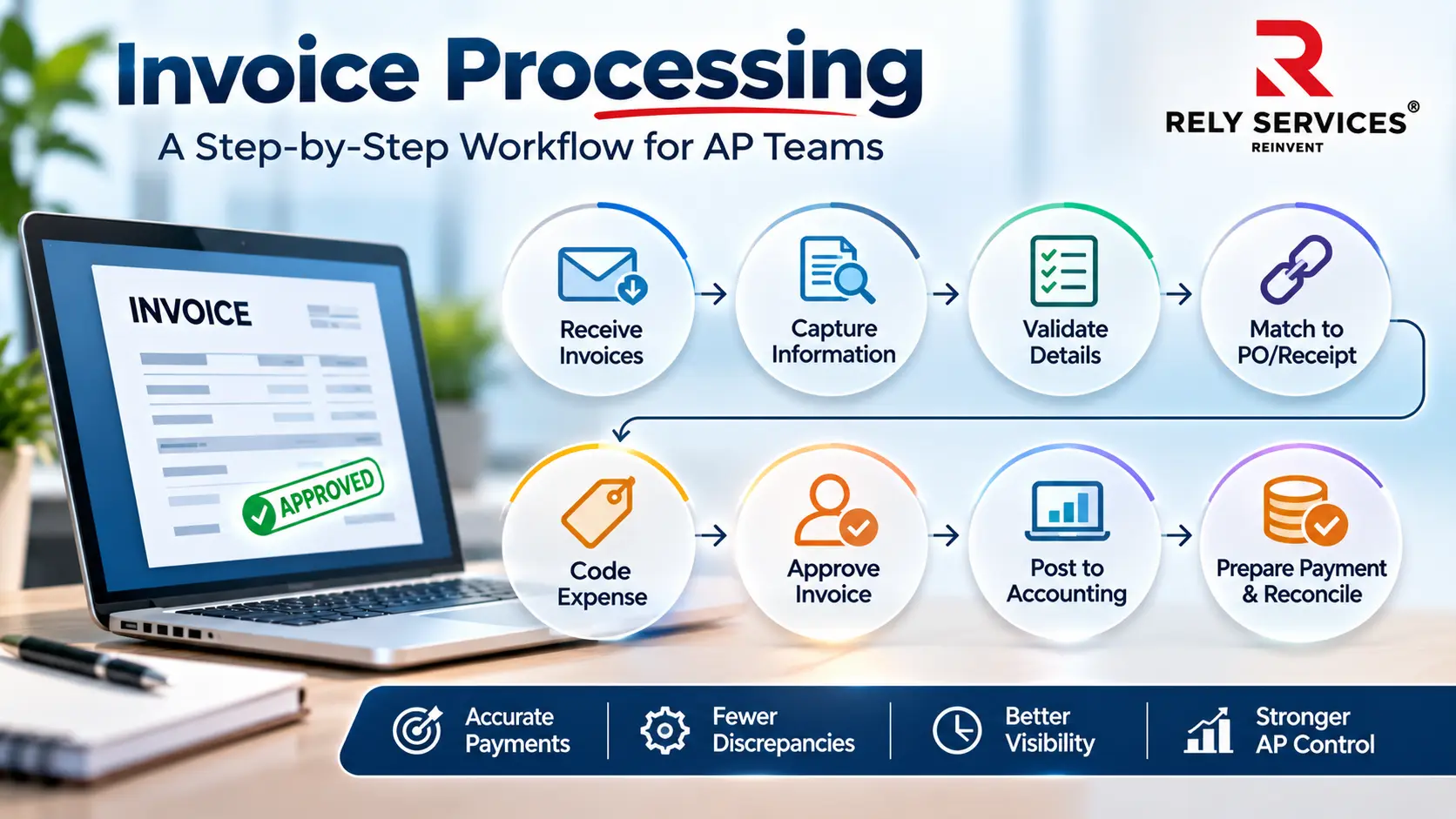
Invoice processing is the process of receiving, reviewing, verifying, approving, and recording supplier invoices before they are prepared for payment. It helps accounts payable (AP) teams confirm that each invoice contains accurate information, matches the relevant purchase or service records, and has the required authorization.
A well-defined invoice processing workflow helps businesses manage supplier payments, identify discrepancies, reduce duplicate entries, and maintain accurate financial records. It also gives AP teams visibility into where each invoice stands, from initial receipt to final payment reconciliation.
This guide explains the eight main steps in invoice processing, the checks AP teams should perform at each stage, and how businesses can maintain an accountable workflow.
How does an invoice processing workflow work?
An invoice processing workflow moves a document through defined states, with a responsible owner and evidence at each transition. A practical sequence is receipt, capture, validation, matching or substantiation, coding, approval, posting, payment preparation, and reconciliation.
Some activities happen together or in a different order. Coding may precede matching, for example, while the accounting system may recognize a liability before payment authorization is complete. Document the actual sequence instead of assuming the software’s default status describes the business decision
| Stage | Main question | Evidence to retain |
| Receipt | What arrived and where did it enter? | Receipt reference and original document |
| Capture | What information does the invoice contain? | Extracted fields linked to the source |
| Validation | Is the information complete and usable? | Check results and unresolved issues |
| Matching | Is the charge supported by purchasing evidence? | Order, receipt, or approved alternative |
| Approval | Has the authorized person accepted the expense? | Decision, identity, time, and context |
| Posting | Was the item recorded in the intended entity and accounts? | Accounting reference and posting result |
| Payment preparation | Is the item eligible for an authorized payment run? | Payment proposal and required authorization |
| Reconciliation | Do payment and accounting records agree? | Settlement status and resolved differences |
Step 1: Receive invoices through accountable channels
Define the channels suppliers should use and how incoming items become tracked work. A shared mailbox, portal, or supported integration can all be part of an approved design. The key is knowing what arrived, when, and who owns it next.
Assign a receipt reference and preserve access to the source. Decide how the team handles attachments, resubmissions, unreadable files, and invoices sent directly to employees. A central channel is useful only if bypassed submissions are redirected into the same accountable process.
Distinguish invoices from related documents
A quotation, statement, purchase order, and credit memo should not automatically enter the same path as an invoice. Establish document categories and routing instructions, including how reviewers handle an attachment that contains several document types.
Repeated submissions also need review. A later attachment might be a corrected invoice, not another payable item. Preserve the relationship between submissions before suppressing a duplicate or creating a second accounting entry.
Step 2: Capture the information needed downstream
Capture the fields required for identification, validation, coding, and payment preparation. These may include supplier reference, invoice number, invoice date, currency, amount, purchase order reference, and line details relevant to the transaction.
Define what each field means and where it comes from. The invoice date is different from the received date, and a supplier’s name is different from its approved master-data identifier. Keep those distinctions visible when configuring the workflow.
Capture can involve manual entry, structured electronic data, or document extraction technology. The method does not establish correctness.
Managing invoice receipt and data capture accurately is essential for an efficient accounts payable operation. However, as invoice volumes increase, businesses may need additional support to handle data entry, validation, document processing, and other routine AP activities. Rely Services provides invoice processing services to help businesses manage these activities and maintain a more organized invoice processing workflow.
Step 3: Validate the invoice and supplier association
Validation checks whether required information is present, internally coherent, and associated with the intended supplier and buying entity. Build checks around the data and transaction risks that matter in the organization’s operating model.
Review identity and duplicate candidates
Use approved supplier records rather than creating an identity from the invoice’s display name alone. Consider invoice number, supplier identifier, amount, currency, and other relevant context when investigating potential duplicates.
A duplicate flag is a reason to investigate, not proof that an invoice is invalid. Similarly, a slight variation in punctuation should not be the only reason two submissions escape review. Document the decision and link it to the affected item.
Handle payment-detail changes separately
An invoice is not sufficient authority to change bank details. Route changes through the organization’s independently verified master-data process. Avoid responding to a suspicious request using only the contact details supplied in that request. The specific verification method should be approved by the organization’s security and finance owners.
Step 4: Match the charge to purchasing evidence
For a purchase-order-based invoice, compare the invoice with the relevant purchasing records. A two-way comparison examines invoice and order information; a three-way comparison also considers receipt evidence. Define which method applies to the purchase type rather than treating one method as suitable for every invoice.
Check relevant quantities, prices, units, and references. If deliveries are partial, the workflow must distinguish what has been received from what remains outstanding. A matched total alone may conceal a line-level disagreement.
Establish an alternative for non-PO spending
Some organizations permit specific purchases without a purchase order. Define the evidence and authorization required for those categories. A non-PO invoice still needs a documented basis for accepting the expense.
For a hypothetical professional-services charge, that basis might include a contract reference and confirmation from the authorized service owner. The example is a process design, not a claim that such evidence is sufficient for every contract or organization.
Step 5: Resolve exceptions before the next decision
An exception is a condition that prevents an invoice from following its expected path. Examples include missing information, price differences, uncertain receipt, and conflicting supplier references. Assign the issue to someone able to resolve it.
Keep the reason, owner, next action, and status visible. A general hold without a named decision maker creates work that can remain outstanding even after someone supplies the missing information.
Do not overwrite the original invoice merely to make a check pass. Corrections, credit memos, and approved differences need a traceable handling method.
Step 6: Code and route the invoice for approval
Assign the appropriate entity, account, department, project, or other required dimensions under approved accounting rules. Establish who can recommend coding and who can authorize changes where the consequences warrant separate review.
Approval should identify the expense or service being accepted and the authority under which the decision is made. Define routing by the factors relevant to the organization, such as spending responsibility, category, amount, and entity.
Make decisions and absence coverage explicit
Distinguish approval, rejection, and a request for more information. Record the version or transaction details that the approver reviewed. If material details change, determine whether another approval is required. Plan authorized delegation rather than allowing work to wait indefinitely for an absent employee.
Step 7: Post and prepare eligible items for payment
Confirm that the accounting system accepted the intended transaction and returned an identifiable result. A successful interface transmission does not by itself show that the invoice was posted to the correct entity or account.
Reconcile attempted postings with accepted, rejected, and pending outcomes. Handle retries so a temporary integration failure does not result in duplicate entries. Assign a responsible owner to records whose final status is uncertain.
For payment preparation, apply approved terms and eligibility checks. Invoice approval, payment authorization, and payment execution can be distinct responsibilities. Document these boundaries so “approved” is not mistaken for permission to bypass the payment controls.
Step 8: Reconcile and maintain the record
After payment activity, compare the relevant payment results with the accounting records. Investigate rejected transfers, returned payments, reversals, credits, and items that remain open unexpectedly. An issued payment instruction is not necessarily a settled payment.
Keep the invoice, relevant purchasing evidence, approval history, exception decisions, and accounting references accessible through approved records-management arrangements. The IRS recordkeeping resource is a candidate source for tax-related recordkeeping context, not a universal retention schedule for every document.
Finance, legal, and records owners should determine the applicable retention and access requirements. Avoid inserting a fixed retention period without checking the document type, jurisdiction, contracts, and other obligations.
What should AP teams measure?
Choose measures that expose the work behind the completion count. Useful candidates include elapsed time from receipt to accepted completion, unresolved issues by age, repeat handling, and failed postings by reason. Define the starting event, ending event, population, and exclusions.
Separate active handling from waiting for information or authorization. A team cannot diagnose a long cycle time if all waiting is grouped into one unexplained number. Review ordinary cases and difficult cases rather than removing exceptions from the measurement population.
Adapt the process to volume without losing accountability
When supplier and invoice volumes increase, define how queues, capacity, and system interfaces will be monitored. A larger intake channel does not remove the need to reconcile receipts, exceptions, postings, and payment outcomes.
Segmenting work can help identify items that need specialist attention, but every segment still needs an owner and a completion condition.
Follow one invoice through the decisions
Consider a hypothetical invoice for equipment delivered in two shipments. Intake records the supplier submission, captures the invoice reference and line information, and associates it with the buying entity. The purchasing comparison then reveals that receipt evidence covers only part of the invoiced quantity.
At this point, the invoice should not simply move forward because its total was captured correctly. The assigned owner needs to establish whether the remaining goods arrived, whether the invoice needs correction, or whether an approved partial treatment applies. The resolution becomes part of the evidence presented to the authorized reviewer.
After the permitted decision and accounting actions, the team reconciles what was actually posted and paid. If a system retry occurred, it confirms that the retry did not create another payable item. The example shows why each stage has a separate completion condition: capture, acceptance, and authorization, posting, and settlement answer different questions about the same invoice.
Build an operating procedure people can follow
A well-defined invoice processing workflow helps AP teams maintain accurate records, resolve discrepancies, and keep supplier payments moving through the appropriate approval channels. However, managing these activities can become challenging as invoice volumes and supplier requirements increase.
Businesses that need additional processing capacity can explore Rely Services’ invoice processing services. Rely supports invoice data capture, validation, PO matching, exception handling, and workflow management to help businesses manage their accounts payable operations.
Frequently asked questions
Is invoice processing the same as invoice payment?
No. Invoice processing prepares and validates a payable item and records the relevant decisions. Payment is a later activity that transfers funds under separate authorization. An organization should define how processing status, payment eligibility, and settlement status relate without treating them as identical.
Who owns an invoice while it is waiting for information?
Assign a named operational owner even when another team or supplier must provide the answer. Record the next action and escalation route. Ownership should not disappear simply because the invoice is paused or outside AP’s immediate ability to resolve.
Should supplier statements be entered as invoices?
Do not automatically treat a statement as a new payable document. Establish a separate review route that compares the statement with existing records and identifies missing or disputed items. Confirm the underlying invoice before creating another accounting entry.
Can invoice processing work across several legal entities?
It can, if entity identification, access, accounting rules, approval authority, and reconciliation are explicitly designed for that arrangement. Test invoices with ambiguous buying-entity details. A shared AP team should not choose an entity merely to clear an intake queue.
Does every invoice need a purchase order?
That depends on the organization’s purchasing policy and permitted exceptions. Define which categories require a PO and the approved alternative evidence for others. Do not invent an order reference or assume that a non-PO invoice may proceed without authorization.
What should a new AP team document first?
Start with the intake channels, process states, accountable owners, and evidence required for acceptance. Add exception routes and payment boundaries before expanding automation. A shared understanding of these decisions gives the team a concrete basis for reviewing tools and external support.